Free AI 3D Icon Generator
Create stunning 3D rendered icons with clay, glass, and metallic finishes. No 3D software needed.
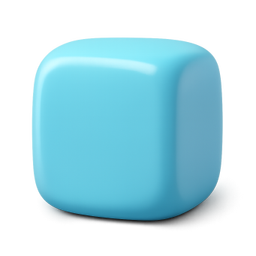
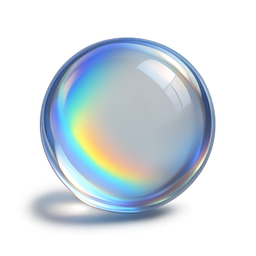


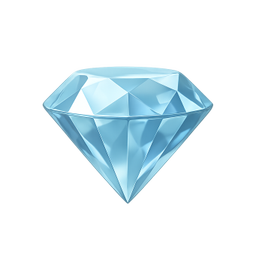

Example icons generated with Pixelle
Sound familiar?
The old way
- ✗3D software has a steep learning curve
- ✗Rendering takes forever
- ✗Maintaining consistent 3D style is difficult
With Pixelle
- No 3D software required
Skip Blender and Cinema 4D. Get professional 3D icons without learning complex software.
- Multiple 3D styles
Clay renders, glass effects, metallic finishes, isometric views - choose your aesthetic.
- Perfect lighting every time
Consistent shadows and highlights across your entire icon set. Professional studio quality.
- Instant generation
No render queues or waiting. Get your 3D icons in seconds, not hours.
- Transparent backgrounds
Every icon comes with a transparent background, ready to drop into any design.
- Commercial use included
Use your icons anywhere - apps, websites, products, client work. No extra licenses needed.
Simple Process
How to Use the Free AI 3D Icon Generator
Pick a 3D style
Clay render, glassmorphism, isometric, or low-poly. Each carries different vibes - clay feels friendly, glass feels premium, low-poly feels playful.
Set lighting and materials
Describe the light direction and surface finish. Pixelle handles the rendering - you control whether the icons feel soft or sharp, matte or glossy.
Generate the full set
Render every icon with the same lighting setup and camera angle. That consistency is what makes a 3D icon set look professional rather than collected.
That's it. From idea to icon in under a minute.
Example Prompts for Free AI 3D Icon Generator
Copy these prompts or use them as inspiration for your own icons

Cube
“A 3D glossy cube with rounded edges, soft clay render style, pastel blue gradient, studio lighting, transparent background”

Sphere
“A 3D glass sphere with rainbow refraction, crystal ball aesthetic, soft shadows, transparent background”

Star
“A 3D inflated star, puffy balloon aesthetic, golden yellow gradient, soft studio lighting, transparent background”

Heart
“A 3D glossy heart, red gradient with reflections, clay render style, soft shadows, transparent background”

Diamond
“A 3D crystal diamond, faceted with light reflections, pale blue tint, luxury feel, transparent background”
How to make 3D icons that look professional
Most AI-generated 3D icons look like single demo renders. These principles are what turn them into a usable set.
Lock your lighting direction
Every icon in a set should have light coming from the same angle - typically top-left at 45 degrees. Mixed lighting is the fastest tell that a set was generated piecemeal.
Match material finish across icons
Don't mix glossy plastic with matte clay in the same set. Pick one surface treatment and apply it everywhere or the icons fight each other visually.
Use the same camera angle
3/4 view at a consistent tilt looks intentional. Mixing front-on icons with isometric icons in one collection feels chaotic. Pick the angle once, use it everywhere.
Keep the color palette tight
Even with 3D rendering's freedom, restrict yourself to 3-5 base colors across the set. Variety should come from form, not from chasing the rainbow.
Give each icon breathing room
3D icons need padding to read. Fill the entire frame and they feel claustrophobic. Aim for the icon to occupy 60-70% of the canvas.
Render at 2x for retina
Generate at 512px or 1024px even if you'll display at 128px. Retina screens and zoomed UIs will reveal compression artifacts in anything smaller.
The case for 3D icons in your product
3D icons replaced flat icons as the default design trend around 2022, led by Stripe, Notion, and a generation of YC startups that wanted to feel premium without hiring a brand studio. Five years later, the look has saturated - which is both a problem and an opportunity. Saturated means table stakes: customers expect production-grade visuals from any new tool. Opportunity, because the production cost has collapsed.
What 3D icons actually communicate is investment. A flat icon set says 'we shipped fast.' A 3D set says 'we cared about how this looks.' For consumer products, marketing pages, onboarding flows, and pitch decks, that signal is worth chasing. Investors notice. Users feel it without articulating it. Press shots look better.
The traditional way to get 3D icons is to license a Spline or Iconscout pack and accept that thousands of other products are using the same assets. The bespoke way is to hire a 3D illustrator at $200+ per icon and wait two weeks. Neither path makes sense for a small team shipping weekly.
Pixelle's 3D icon generator lets you produce a custom set in the time it takes to write the prompts. You set your style once - clay, glass, isometric, low-poly - and every icon you generate fits the same visual system. The output works as page icons, feature illustrations, app store screenshots, hero graphics, or anywhere else 3D earns its place.
Related AI Icon Generators
More tools for the same kind of work
Built for
Designers, marketers, and developers who want 3D aesthetics without the complexity
FAQ
Free AI 3D Icon Generator FAQ
What is an AI 3D icon generator?
An AI 3D icon generator uses artificial intelligence to create three-dimensional icon designs from text descriptions. Instead of manually modeling in Blender or Cinema 4D, you describe what you want and get professional 3D icons in seconds.
What 3D styles can I create?
Clay render, glass, metallic, plastic, inflated, isometric, low-poly - describe the style you want and Pixelle will generate it. Popular styles include soft clay renders, glossy glass effects, and chrome metallic finishes.
Is this 3D icon generator free to use?
Yes! Pixelle offers free generations to get started. No credit card required. Create your first 3D icons today and upgrade only if you need more.
Can I control the lighting and shadows?
Yes! Specify lighting direction, shadow softness, and ambient occlusion in your prompt for precise control over your 3D icon's appearance.
Are these actual 3D model files?
Pixelle generates high-quality 2D images with a 3D appearance. For most use cases like websites, apps, presentations, and marketing materials, this is exactly what you need - no 3D software required to use them.
How is this different from Blender or other 3D software?
Traditional 3D software requires learning complex tools, setting up lighting, materials, and rendering - which can take hours. With Pixelle's AI 3D icon generator, you describe what you want and get results in seconds. No learning curve, no render times.
Can I use these 3D icons commercially?
Yes, all icons generated with Pixelle are yours to use commercially. Use them in apps, websites, products, client work, and marketing materials.
Does the 3D icon generator work on mobile?
Yes, Pixelle works on any device with a web browser - desktop, tablet, or mobile. Generate 3D icons from anywhere, no app installation required.
How do I get the best results from the AI 3D icon generator?
Be specific in your prompts. Include the 3D style (clay, glass, metallic), colors, lighting preferences, and any specific details. For example: 'A 3D clay render shopping cart icon, soft pink, matte finish, soft studio lighting' works better than just 'shopping cart'.
What file formats and sizes can I download?
Icons are generated as high-quality PNG files with transparent backgrounds, perfect for use in apps, websites, and presentations. You can resize them as needed for your project.

Ready to create your icons?
Join thousands of creators using Pixelle to build beautiful products.
Free to start · No credit card required